Should I Record a Webinar in a Studio? What Changes
Should I Record My Webinar in a Studio? Here's What Actually Changes
You've invested time building the content. Your subject matter is solid. But when the webinar runs, something feels off — the audio is thin, the lighting is harsh, and the credibility you've built in person doesn't translate through the screen. It's a common gap, and it's almost never about the topic.
The question isn't whether your audience will tolerate a home setup. The question is how much production quality affects what they decide to do next.
A professional studio doesn't just improve how a webinar looks — it removes every technical variable that works against you, so you can focus entirely on what you're saying instead of whether the equipment is cooperating.
Quick answer
Recording a webinar in a professional studio changes your audio clarity, lighting consistency, camera quality, and how confident you look on screen. If your webinars drive revenue, client trust, or internal training outcomes, a studio removes every production variable that works against you — without requiring you to manage any of it yourself.
The Real Problem With Home and Office Webinar Recordings
Home and office recordings don't fail because the presenter isn't good. They fail because the environment is working against the presentation before a single slide goes up.
Lighting changes throughout the session as clouds shift or overhead fixtures flicker. Consumer-grade microphones pick up HVAC hum, keyboard clicks, and street noise. Laptop cameras shoot from below desk level, which is not a flattering angle for anyone. And background clutter — even subtle clutter — signals to viewers that this presentation wasn't prepared with them in mind.
None of these are fatal on their own. Together, they create low-grade friction that makes viewers work harder to stay engaged. In a sales webinar or executive presentation, that friction has a cost.
The other problem is operator attention. When you're managing slides, monitoring the chat, watching your own video preview, and hoping the wifi holds, you're not fully present in the conversation. Webinar production services at a professional studio put a dedicated production team on the technical side so you can stay focused on the room.
What a Professional Studio Actually Changes
The visible difference is immediate. But the more important changes are the ones the audience feels without being able to name them.
Audio. A broadcast-quality microphone in an acoustically treated room captures your voice cleanly — no room reverb, no background hum, no clipping on consonants. Clean audio is the single biggest driver of perceived credibility in video content. Viewers will watch grainy video; they will not tolerate bad audio.
Lighting. Professional studio lighting is balanced, consistent, and flattering. There are no harsh shadows from overhead fixtures, no blown-out windows behind you, and no color temperature shifts as the session runs. You look the same in minute 60 as you did in minute one.
Camera. A 4K broadcast camera at eye level — properly framed and focused before you walk in — produces a different result than any webcam at any price point. The depth of field, color accuracy, and image stability are in a different category.
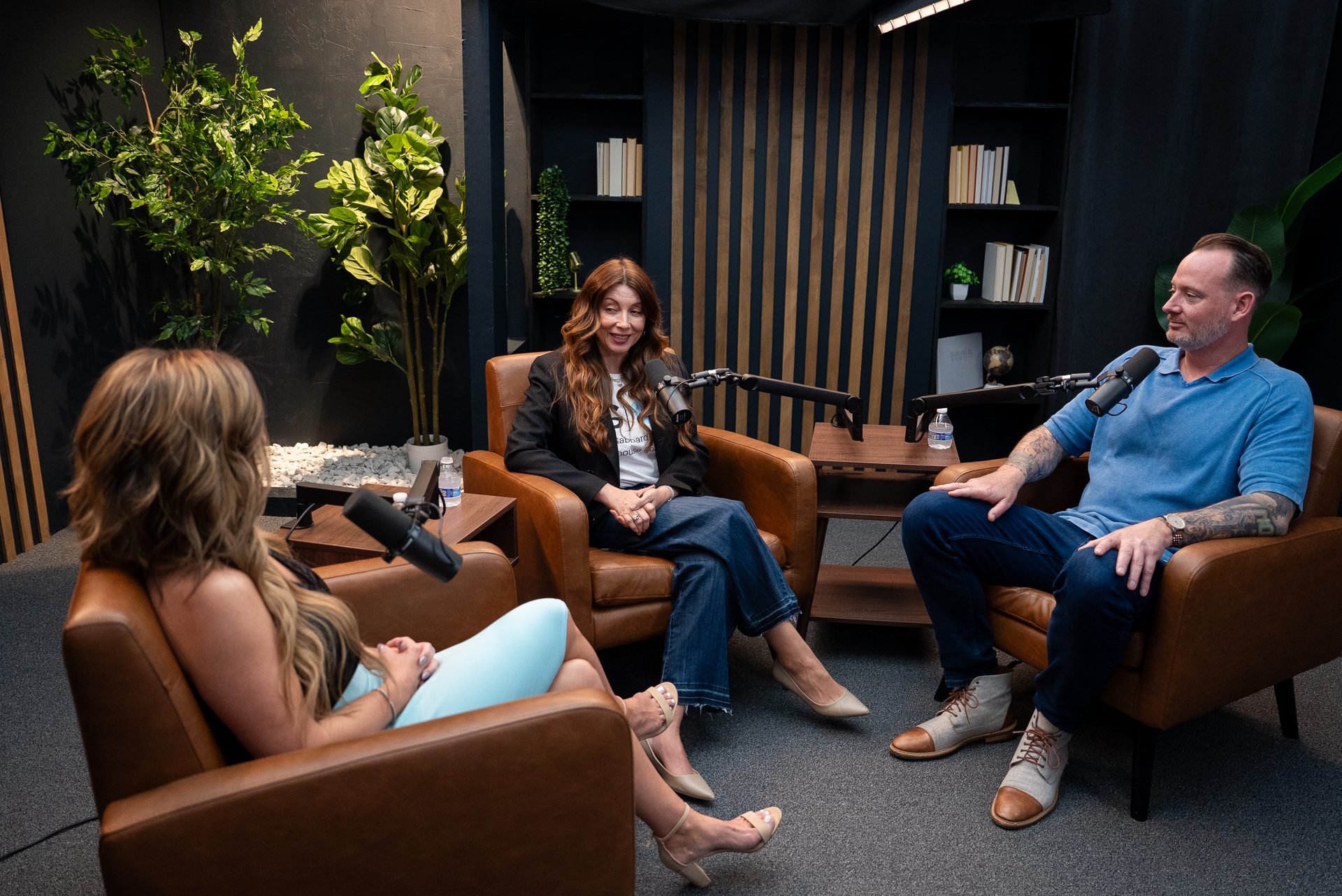
Production support. CPS has a production team on-site managing the technical side of the session. Slides advance. Cameras switch. Recordings run. You show up, present, and leave. That's the whole job.
For teams doing panel discussions or multi-speaker formats, the studio supports live multi-camera switching so visual cuts happen in real time — not in post-production. Every speaker is framed and lit properly. No one is on a laptop in a corner looking like a different webinar entirely.
If your organization is building a library of on-demand webinar content for training or lead generation, consider how this connects to broader course creation services — the same session can produce both the live webinar and a polished on-demand version without additional recording time.
Who Should Record Webinars in a Studio
Not every webinar needs a studio session. A quick internal team update or a low-stakes onboarding call can run fine from a well-lit home office. But there are clear use cases where the production environment stops being optional.
Consultants, coaches, and service firms running sales webinars. If the webinar is part of your sales process — a live demo, a lead nurture event, a virtual workshop for prospects — your production quality is part of the pitch. Buyers make trust decisions fast, and the studio is the one variable you can control completely.
B2B organizations doing recurring training or onboarding webinars. If you're delivering the same content to hundreds of employees or customers every quarter, the recording quality affects retention and completion rates. A session recorded once in a professional studio can run for years as a polished on-demand asset.
Executive and thought-leadership presentations. When the speaker's authority is part of the message — keynote-style presentations, investor updates, industry panels — the visual environment needs to match. A studio session reinforces that what's being said matters.
Organizations frustrated with inconsistent home results. If your team has been through multiple rounds of webcam upgrades, lighting kits, and background blurs without closing the quality gap, the problem is the environment, not the equipment. A studio solves it at the root.
If you're a B2B team in Cincinnati or Northern Kentucky using webinars to generate leads, close deals, or deliver training at scale, the production gap between home recording and a professional studio is a business problem — not just an aesthetic one. Consulting and content strategy work at CPS often starts with this conversation.
What to Expect From a Webinar Studio Session
The process at Cincinnati Podcast Studio is designed to reduce friction for the presenter and production team alike.
Before the session starts, we run a full tech check: slide deck loaded, camera framing confirmed, audio levels set, run-of-show reviewed. By the time you sit down at the table, every variable is already resolved.
During the session, the production team manages the switch. If you're running a panel format, cameras cut between speakers in real time. If you're presenting solo with slides, transitions are handled. Chat monitoring or Q&A management can be staffed separately or handed off entirely.
After the session, you leave with a clean recording file — broadcast-quality video and audio, ready for distribution or editing. That file can become the on-demand version of the live webinar, a series of short clips for short-form video production, or source material for a blog post or email series.
Optional: teleprompter support for scripted presentations. Some clients prefer to read directly from a script for compliance or messaging consistency reasons. We accommodate that without it looking like a teleprompter presentation.
The CPS studio is purpose-built for exactly this kind of work. If you're curious what a session looks like in practice, the Cincinnati Business Podcast runs entirely from this space — that's a reliable reference point for production quality and format.
Common Objections (And Straight Answers)
"I can just buy better equipment." Better gear helps at the margins. But equipment purchases don't solve acoustics, don't provide consistent lighting calibrated to your environment, and don't free up your attention during a live session. Most home recording upgrades produce diminishing returns after the first $500. A studio removes the ceiling entirely.
"My audience doesn't care about production quality." They may not say anything. But trust is built and lost in the first 30 seconds of a video call — before a single slide appears. Subpar audio and video don't make the content worse; they make it harder for the content to land. That's a measurable difference in outcomes.
"We only do webinars once or twice a year." That's actually the strongest case for renting rather than building. You get broadcast-quality results for the sessions that matter most without a permanent infrastructure investment or a production team on payroll. Studio rental options are designed for exactly that kind of periodic high-stakes use.
"We have an internal AV team already." Great — they can focus on internal communications while CPS handles external-facing, revenue-adjacent webinar production. The two aren't in conflict. Many organizations with internal teams still use a professional studio for their highest-visibility sessions.
Frequently Asked Questions
Do I need to record my webinar in a studio?
Not every webinar warrants a studio — but any webinar where credibility, sales conversion, or training retention is on the line almost always benefits from one. The gap between home recording and professional production is visible and audible.
What types of webinars work best in a studio?
Sales and demo webinars, executive thought-leadership sessions, multi-speaker panels, and high-volume onboarding or training content are the strongest fits. The more often the webinar runs or the more revenue it touches, the clearer the ROI.
Can I record a live webinar in a studio or is it just for pre-recorded sessions?
Both. CPS supports live webinar broadcasts as well as pre-recorded sessions that get distributed on-demand. We also capture a clean recording file either way so you can repurpose the content afterward.
How much setup time does a webinar studio session require?
Plan for 30–45 minutes of pre-session setup and tech confirmation — slides, camera angles, audio levels, and run-of-show review. The actual production time depends on your format. Most sessions run 60–90 minutes total.
What if I want a panel format with multiple speakers?
Multi-speaker panels work well in the studio. We use a multi-camera setup with a live production switcher so the visual cuts happen in real time, not in post. Each speaker is framed and lit properly — no one's on a laptop camera in the corner.
Is a Cincinnati webinar studio available for one-time or recurring sessions?
Yes. Many clients use CPS for quarterly or annual flagship webinars, while others book recurring monthly sessions. Studio rental options are flexible — reach out via a Discovery Call to discuss your schedule and volume.
Ready to Record Your Next Webinar in a Studio?
The content you've built deserves a production environment that works with it instead of against it. Whether you're running a quarterly sales webinar, an executive thought-leadership series, or a recurring training program, the studio is the variable that changes what's possible.
Start with a Discovery Call — we'll walk through your format, your goals, and what a session at CPS looks like for your specific use case. Or contact us directly if you have a session on the calendar and want to move quickly.
You've also spent time building the video podcast studio in Cincinnati side of things — webinar production runs on the same infrastructure. One studio, multiple content formats, no additional production overhead.